PRODUCTIVITY / WEB APP
FluksBoard
Making team workload visible through a capacity-aware Kanban experience.
- Type
- WEB APP · PRODUCTIVITY
- Role
- Frontend engineering, interaction design, and product experience
- Stack
- React
- JavaScript
- Bootstrap
- Node.js
- Express.js
- MySQL
- JWT authentication
- Source
- GitHub
Nine pages of notes, sketches and maths on how FluksBoard makes team workload visible.
p. 01 — the question
Does this person have room for another task?
FluksBoard is a task management web application that combines Kanban boards with a visual workload indicator. It helps teams consider task complexity, priority, and deadline pressure when deciding how to distribute work.
The central question was simple: how can a task management tool show whether someone has room for another task?
p. 02 — the problem
A task count tells only part of the story.
Two people can have the same number of assignments while facing very different demands. A complex task with an urgent deadline can require more attention than several smaller tasks.
I approached FluksBoard around the idea that workload should be visible alongside task progress — a clearer starting point for conversations about capacity and ownership.
p. 03 — the approach
A familiar Kanban, plus a score called Neural Load.
Each task gets a score from three inputs:
- Complexity — the estimated difficulty of the work.
- Priority — its relative importance.
- Deadline pressure — how soon it needs attention.
p. 04 — score → signal
Make the calculation readable at a glance.
A brain illustration with changing heat levels represents workload. A status label, a number and a remaining-capacity message back it up, so the result never depends on colour alone.
An abstract score becomes a practical question: does this assignment fit within the person’s remaining capacity?
p. 05 — the live demo
Show your working, like a maths exam.
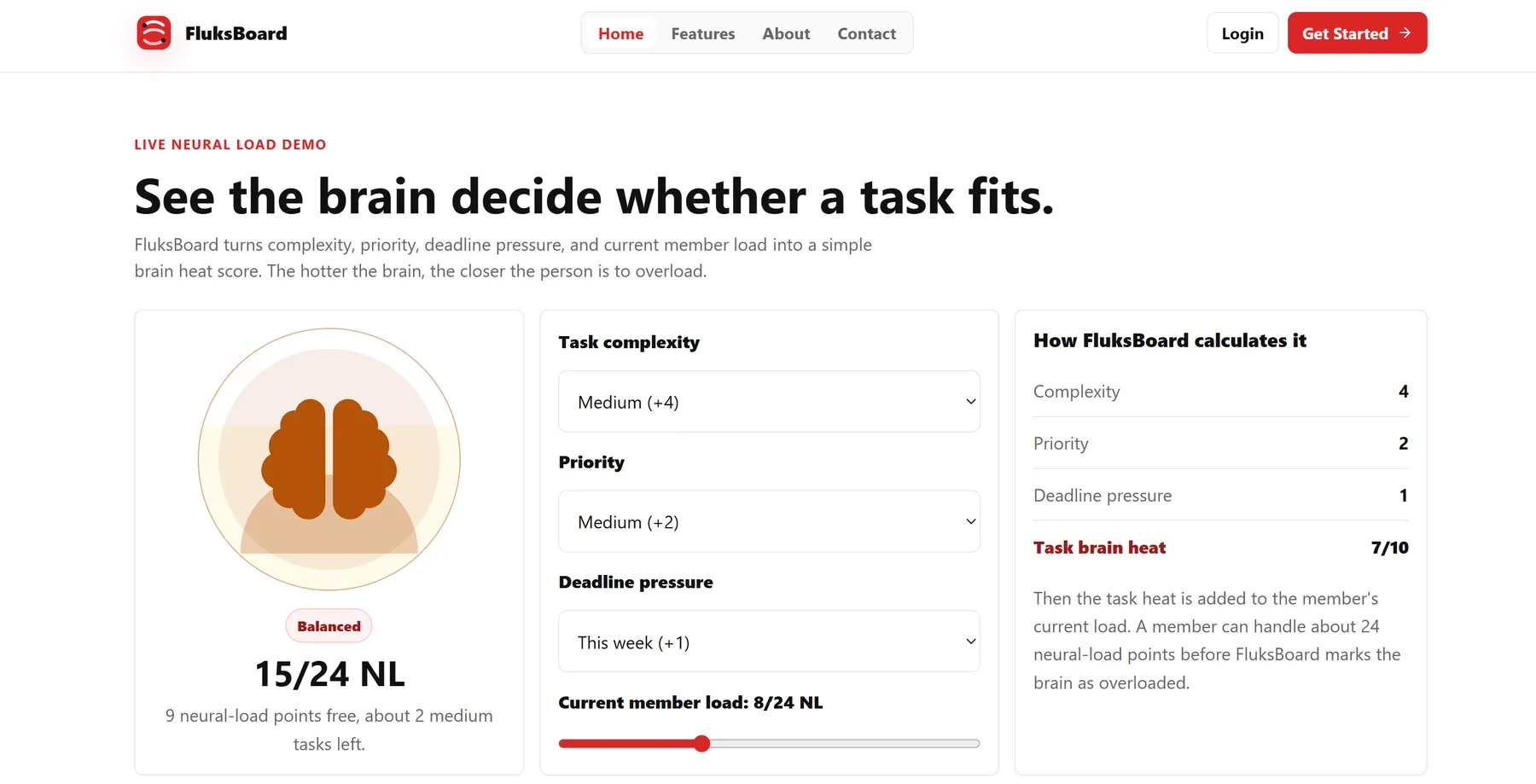
The landing page has a live demo: visitors adjust complexity, priority, deadline pressure and current load, and see the visualization, the controls and the breakdown side by side. Here is its example, worked on paper — try the load.
complexitymedium+4
prioritymedium+2
deadlinethis week+1
task heat7/10
current load+8
=15 / 24 NL
→ 9 points free
p. 06 — visual direction
White, charcoal, one loud red.
A restrained palette, bold typography and clearly separated cards keep the interface easy to scan. Large numbers establish the main result; supporting text explains it — an immediate overview and a detailed explanation in the same view.
p. 07 — implementation
Boards, members, deadlines — and the scoring logic.
React and JavaScript with Bootstrap for the interface, Node.js and Express.js for the backend, MySQL for persistence and JWT authentication for accounts. The scoring logic converts task attributes into a consistent value, and the interactive demo makes that logic visible before anyone creates an account.
p. 08 — outcome & next steps
An implemented concept, not a proven one — yet.
FluksBoard shows one way to bring workload awareness into task planning. Improvements in productivity or reductions in overload have not been validated.
- Implemented product concept
- Interactive explanation of the core feature
- Test whether teams understand the score
- See if it helps when assigning tasks
- Find out which capacity settings teams need
- Let individual estimates and feedback tune the model
p. 09 — what I learned
A workload indicator needs more than a compelling visual. People need to understand where its value comes from, what it means, and how to act on it.
The strongest design decision was pairing the visual signal with an explicit calculation. It makes the concept easier to explore, and gives people a basis for judging whether it fits their workflow.
— E.H.
Use the arrows, swipe, or the tabs to turn pages. Grab the red pen to mark things up.
{
  "React 18",
  "TypeScript",
  "Vite",
  "Three.js",
}An interactive 3D learning platform that makes data center infrastructure easier to understand.