3D / INTERACTIVE LEARNING
Data Center Simulator
An interactive 3D learning platform that makes data center infrastructure easier to understand.
- Type
- 3D · SIMULATION
- Role
- Product engineering, simulation design, and frontend architecture
- Stack
- React 18
- TypeScript
- Vite
- Three.js
- React Three Fiber
- Drei
- Zustand
- Tailwind CSS
- React Router
- Lucide React
- Source
- GitHub
Field notes on turning power, heat and airflow into something you can explore, break and fix in the browser.
p. 01 — the challenge
Static diagrams can’t show what changes what.
Data center concepts are hard to grasp from static diagrams alone. Server load, cooling, airflow and power distribution are interconnected — learners need a way to see how changing one affects the others.
An interactive 3D learning platform that makes infrastructure easier to understand through exploration and experimentation.
p. 02 — my solution
A data hall you can walk into.
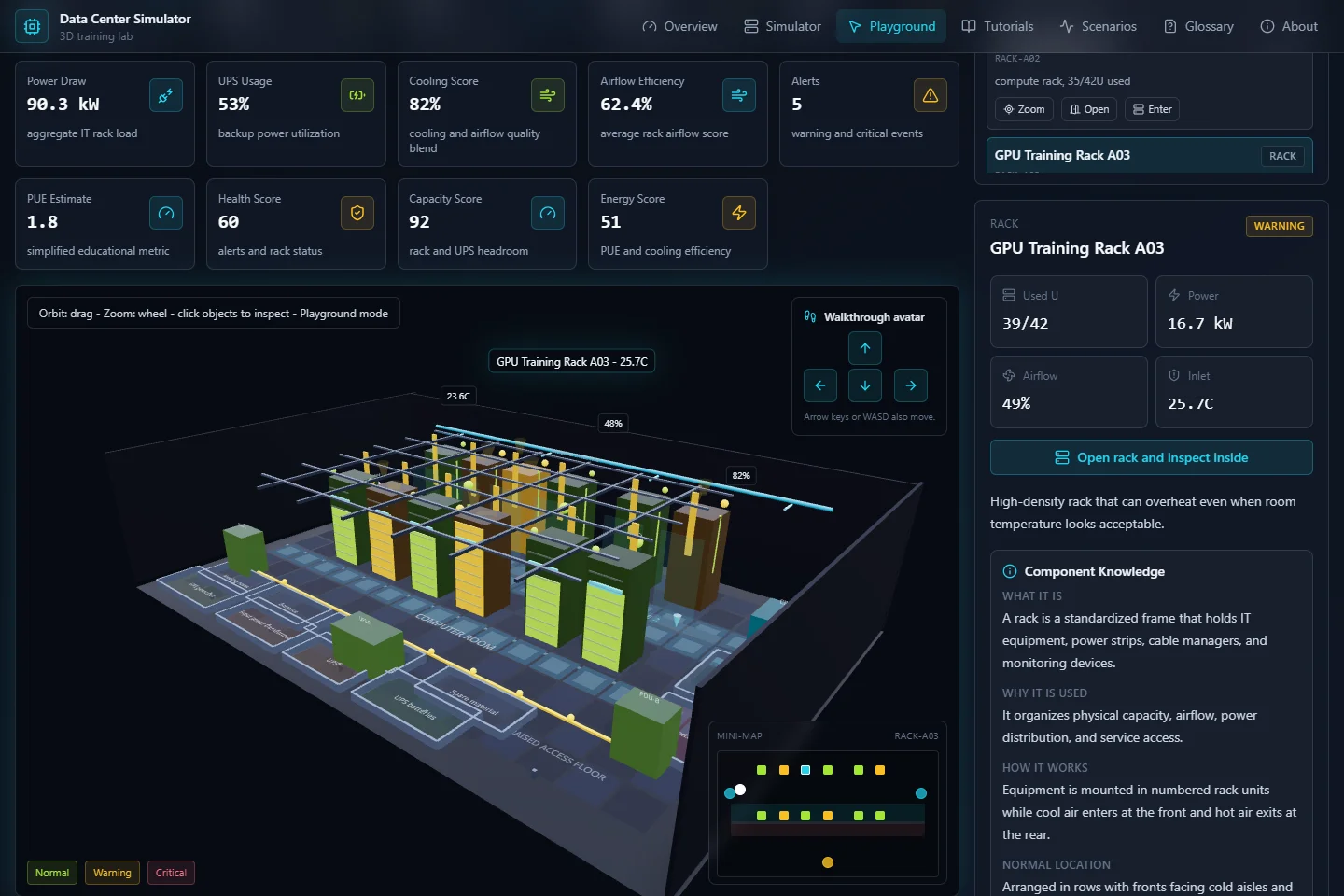
A browser-based simulator that turns these relationships into an interactive learning experience. Users explore a 3D facility, inspect equipment, adjust operating conditions, and watch simulated temperatures, power consumption and system alerts respond.
p. 03 — key features
Six ways in, pinned to the page.
- Interactive 3D explorationOrbit and first-person navigation, searchable infrastructure, and detailed rack inspection.
- Live simulationAdjustable workload, cooling, airflow, and environmental conditions with immediate visual and dashboard feedback.
- Incident trainingFailure scenarios with remediation steps that encourage troubleshooting.
- Guided learningTutorials, quizzes, achievements, and a technical glossary.
- Contextual tutorA rule-based assistant that explains selected components and current simulation conditions.
- Design studioTools for experimenting with custom facility layouts.
p. 04 — try it on paper
Push the load. Watch the heat.
The heart of the simulator in one rack: utilization drives power and heat, cooling pulls the other way. Drag both and see the status change.
- power
- 5.6 kW
- inlet
- 24.0 °C
- status
- normal
p. 05 — technical approach
Four parts that don’t step on each other.
React and TypeScript structure the interface and the infrastructure models; React Three Fiber and Three.js power the 3D environment. Zustand keeps controls, equipment selection, simulation results and learning progress in sync.
Formulas, educational content, state and rendering live apart — so each is easier to maintain and extend.
p. 06 — the core design challenge
Connect every action to a consequence you can see.
The challenge was joining technical detail to a clear learning experience. Visual overlays, component inspection and contextual explanations link what users do to what happens.
- 1. raise rack utilization
- 2. simulated power climbs
- 3. heat shows in the scene & dashboard
p. 07 — outcome
A working prototype that teaches by doing.
A functional educational prototype that brings infrastructure exploration, monitoring and troubleshooting into one experience.
what it demonstrates:
- Interactive 3D development
- Frontend architecture
- State management
- Turning complex systems into usable interfaces
— E.H.
Use the arrows, swipe, or the tabs to turn pages. Grab the red pen to mark things up.
{
  "React",
  "TypeScript",
  "Tailwind CSS",
  "Framer Motion",
}Turning dreams into places to explore.